How to make a split screen summer video

mangoroad team
6 min read
Key takeaways
- Summer split runs your word across the middle of the screen, with one summer moment above it and another below, cutting faster and faster.
- It takes ten photos or clips: pools, beaches, plane windows, city skies, anything that says summer.
- Change the two lines of text and pick one of three script fonts, then export a vertical video of about seven seconds.
A split screen summer video squeezes a whole summer into a few seconds: one big word across the middle of the screen, a different moment flashing above it and another below, faster and faster. The Summer split template in mangoroad builds it from ten of your photos or clips, so your camera roll finally gets a proper recap.
It's bright, quick and easy to rewatch, which makes it a good fit for TikTok, Instagram Reels and YouTube Shorts. Here's what it looks like, how to make it in mangoroad, and how to get more people watching once it's posted.
What the Summer split template is
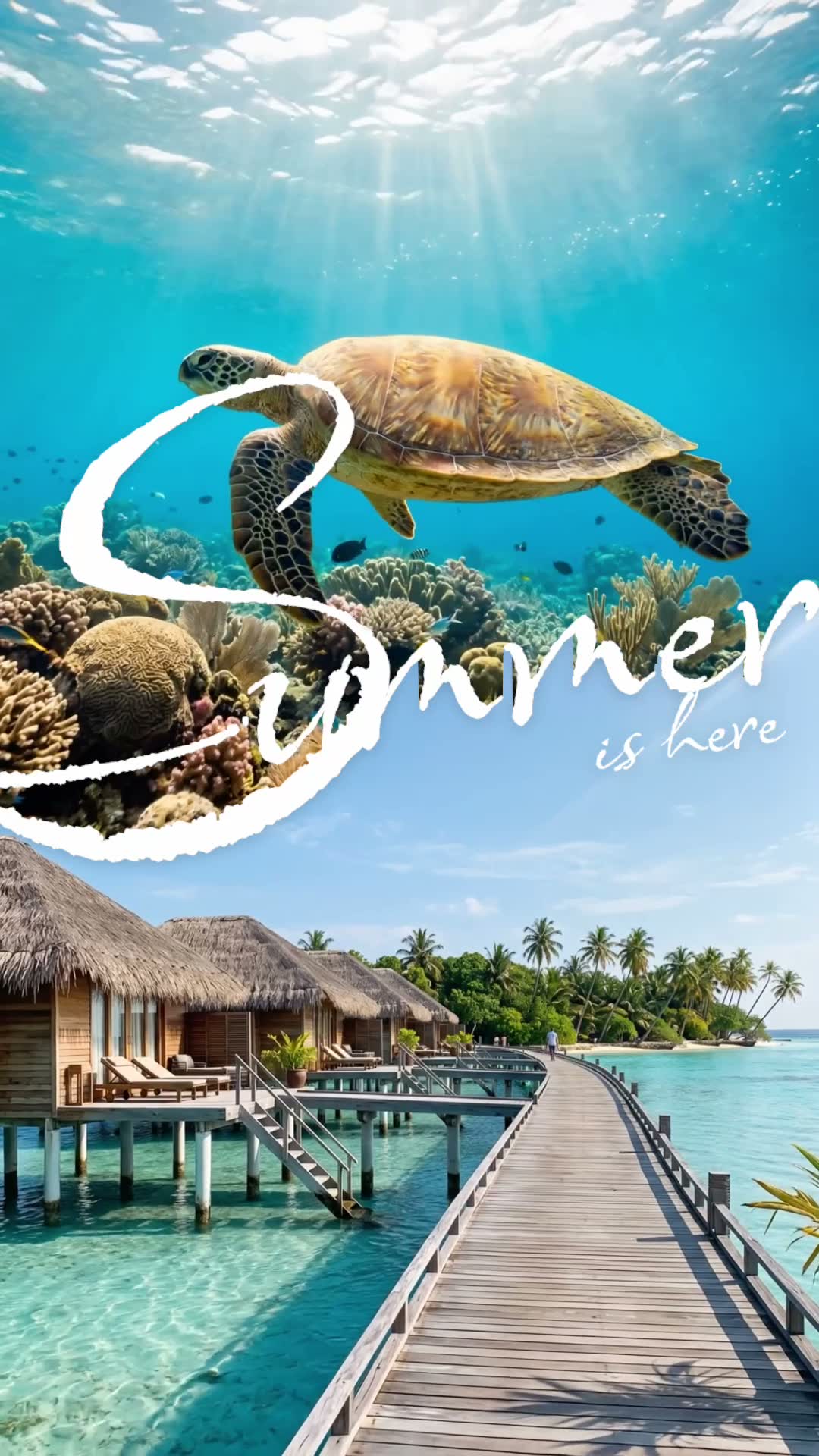
Your word sits across the centre of the screen and splits it in two. Above the letters plays one of your summer moments, below them another, and both swap with every cut. The cuts start relaxed and speed up, so the video builds to a rush of colour before it ends at about seven seconds.
Out of the box, the two lines read “Summer” and “is here” in a flowing script, but you can change both. It suits summer photo dumps, holiday recaps, a festival weekend or simply the best bits of the season, and it's built in the vertical 9:16 shape that TikTok, Reels and Shorts all use.
Who it's for
- Anyone with a camera roll full of summer that never made it onto their profile.
- Travellers who want one quick recap of a trip instead of twenty separate posts.
- Friends and families putting together the highlights of a holiday or a long weekend.
- Anyone who'd rather not learn editing software. The split, the timing and the speed-up are all done for you.
How to make it in mangoroad (step by step)
Step 1: Open mangoroad and pick Summer split
Find Summer split in Discover and watch the preview. When you're ready, tap Use template.
Step 2: Choose ten photos or clips
Summer split takes ten moments, and photos and videos both work. The app suggests a few to get you thinking: floating in a pool, looking up at the city, out of the plane window, sunset on the beach, under the sea, from above over the water. Any summer moment works, though. A few tips:
- Mix it up. Close-ups, wide views and something shot from above keep each cut feeling new.
- Keep the subject central. Each moment fills half the screen, so the middle of every shot matters most.
- Go for colour. Blue water, orange sunsets and bright skies make the split pop.
- Short clips are fine. Each moment only appears briefly, so a second or two of video is plenty.
Step 3: Change the words
Open Text to change the two lines. You could keep “Summer is here”, or make it yours: “Lisbon” and “in July”, “Best” and “summer yet”, or your friends' group name. Then pick a font: there are three script styles, Ms Madi, Allison and Ephesis, all loose and handwritten.
Summer split doesn't come with a song of its own, so add a sound in TikTok, Instagram or YouTube when you post.
Step 4: Preview and tweak
mangoroad shows you the finished video straight away. If a moment doesn't work in its half of the screen, swap it in Clips or reframe it in Adjust. Try your words in each font too: the preview updates every time.
Step 5: Export to Photos and post
Tap Export. The video is saved to Photos and kept in Projects in the app, and the share sheet opens so you can send it to TikTok, Instagram or YouTube.
How to get more people watching
A recap is only fun if people stick around for it. A few ways to help:
Hook them in the first second
Put your strongest moment first: the shot that makes people stop scrolling. Then let your words do the rest. Lines that tease work well:
- “My summer” / “in 7 seconds” for a fast recap.
- “Best trip” / “of my life” for a holiday you're still thinking about.
- “Not ready” / “for it to end” at the end of the season.
Turn it into a series
Make one at the end of every trip, every month or every season, with the same font and a new pair of lines. “June”, “July”, “August” side by side on your profile looks like a set, and gives people a reason to look out for the next one.
Use trends without copying them
Summer recaps come round every year. Instead of copying someone else's, put your own spin on the trending sound or idea: your ten moments, your words, your summer. Add the trending sound when you post.
Post it on TikTok, Reels and Shorts
The export is vertical 9:16, so the same file fits all three. A few small things are worth a minute:
- Cover frame. Choose a moment where your words are clear, so the video reads on your profile grid.
- Caption. Say where and when. People like knowing what they're looking at.
- Sound. Add audio in each app separately, because each has its own sound library.
Keep the conversation going
Ask people which moment they'd want to be in, or where they think the last shot was taken. Questions give people a reason to comment, and the answers often give you ideas for the next video.
Example captions and hashtags
Copy these as they are or use them as a starting point:
For a creator
Ten moments, one summer. Which one would you go back to?
#summerrecap #photodump #splitscreen #summervibes #reels #iphonevideo
For a trip
Two weeks in Greece, squeezed into seven seconds. Already planning the next one.
#greece #travelreel #summerholiday #islandlife #traveldiary #summerrecap
Just for fun
Summer, you were a good one.
#summer #summervibes #memories #photodump #goodtimes
Swap in tags that describe your own video. A few specific ones say more about it than a long list of generic ones.
FAQ
- Is the Summer split template free to use in mangoroad?
- mangoroad isn't on the App Store yet. Making videos with its templates, Summer split included, needs full access in the app, and the app shows you the options before you pay for anything. Get early access on this page and we'll email you when it's ready.
- What photos or clips work best for a split screen summer video?
- Ten different summer moments with clear, bright subjects: water, sky, sunsets, food, a view from above. Each one only fills half the screen, so pick shots where the main thing is near the middle of the frame rather than right at the edge.
- Can I post a split screen summer video to TikTok, Reels and Shorts?
- Yes. It exports to your Photos as a vertical 9:16 video, the shape all three use, so you can upload the same file to each.
- How long should a split screen summer video be?
- The template makes a video of about seven seconds, with the cuts getting quicker towards the end. That's long enough to show ten moments and short enough that people watch it more than once.
Ten moments, two lines, about seven seconds. Go through your camera roll, pick the summer you want to remember and let the template do the cutting. For more fast, beat-led edits, try Grid of gestures or Event Flash, or NYC Perfect Day for a whole day out, and find every new template on the mangoroad blog.