How to make a grid of gestures video

mangoroad team
6 min read
Key takeaways
- Grid of gestures turns 16 short clips of you into rounded windows that regrid on the beat, with white flashes in between.
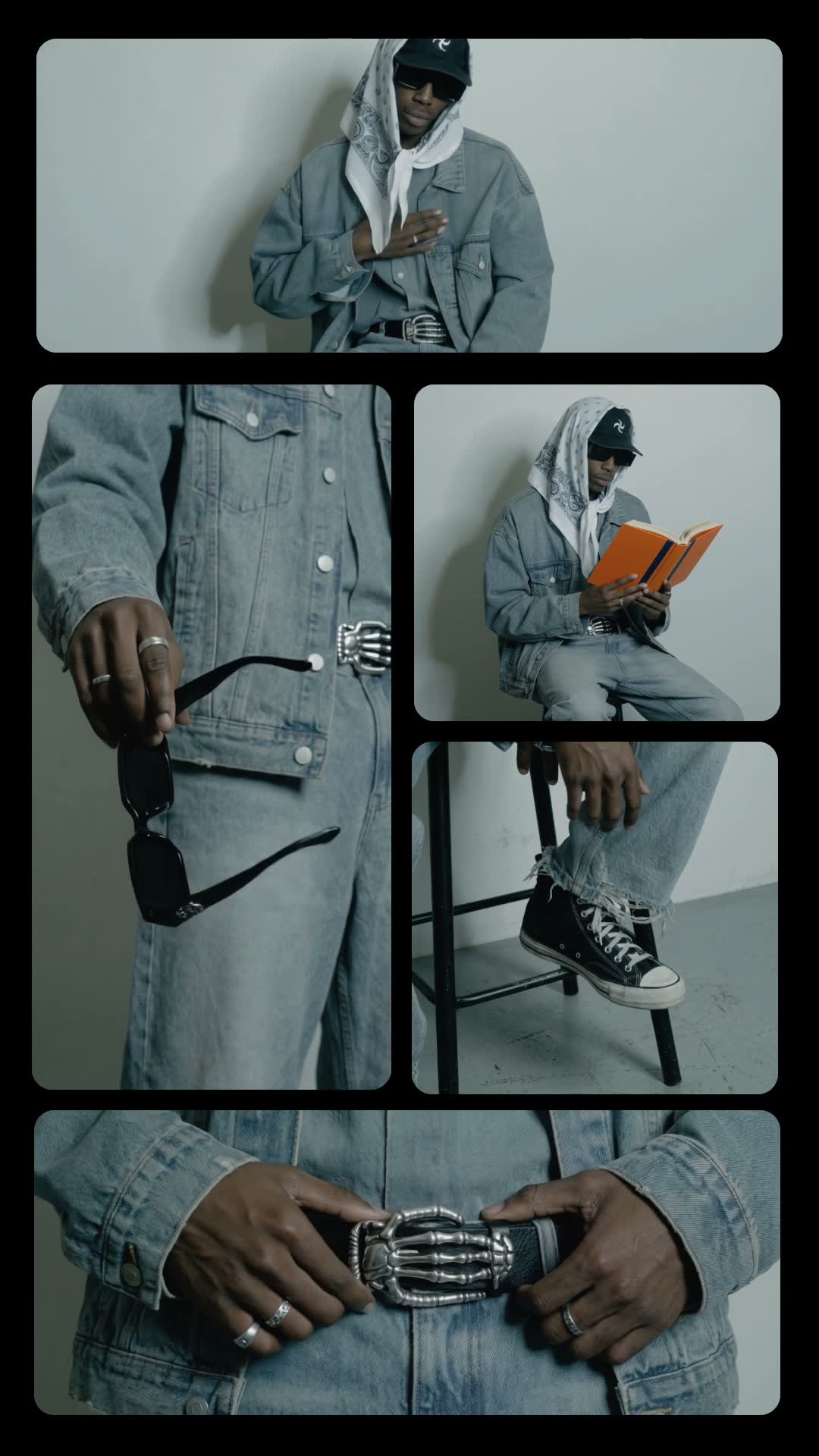
- Film small, deliberate gestures: a hand on your chest, sunglasses swinging, shoes, a belt buckle, reading, a voice note.
- It's cut to Solar Eclipse by Drake and Don Toliver, which you add on Instagram when you post, so the export itself is silent.
A grid video template puts lots of small moments on screen at once, and Grid of gestures does it with your outfit. Sixteen short clips of you, each one a single gesture, sit in rounded windows that regrid on the beat, with white flashes in between. In mangoroad, you film the clips and the template does the layout and the timing.
The result feels like a fashion lookbook that moves, and it holds attention because something changes on every beat. Here's how to film it, how to make it in mangoroad, and how to get more people watching on TikTok, Instagram Reels and YouTube Shorts.
What the Grid of gestures template is
The finished video is vertical and runs for about 25 seconds. The screen is a grid of rounded windows, each playing a different clip of you: your face, your hands, your shoes, your belt, you sitting and reading. On the beat, the grid reshuffles into a new arrangement, and a white flash marks each change.
It's cut to Solar Eclipse by Drake and Don Toliver. The song isn't baked into the video: the preview plays it so you can see the timing, and you add it on Instagram when you post. That keeps the export silent and ready for the platform's own music library.
Who it's for
- Fashion and outfit creators who want something more considered than a straight fit check.
- Anyone with a favourite outfit who wants to show the details: shoes, accessories, the way it moves.
- People who enjoy a bit of styling, setting up a stool, a plain wall and a few props.
- Anyone who'd rather not learn editing software. The grid, the beat and the flashes are all done for you.
How to make it in mangoroad (step by step)
Step 1: Open mangoroad and pick Grid of gestures
Find Grid of gestures in Discover and watch the preview. When you're ready, tap Use template.
Step 2: Film and choose 16 short clips
Each window has its own prompt in the app, so you know exactly what to film. They include sitting wide on a stool with a hand on your chest, swinging your sunglasses by one arm, reading a book and glancing up, your shoes close up while you tap your foot, your belt buckle while you adjust it, and your face side-on as you talk into your phone like a voice note. A few tips that apply to all of them:
- One outfit, one place. Keep the same clothes and a plain wall for every clip so the grid looks like a set.
- One gesture per clip. A single clear movement reads better in a small window than a busy one.
- Keep it short. A few seconds per clip is plenty; the template only uses a slice of each.
- Soft, even light. A bright room or open shade keeps the windows consistent.
Step 3: Check the song
Grid of gestures doesn't have text to change; the clips are the whole story. The preview plays Solar Eclipse so you can check the timing, and the app reminds you that the track is added on Instagram.
Step 4: Preview and tweak
mangoroad shows you the finished video straight away. If a window looks off, swap the clip in Clips, or reframe and trim it in Adjust so the gesture lands where you want it. The preview updates each time.
Step 5: Export and add the music
Tap Export. The video is saved to Photos and kept in Projects in the app. Then follow Add music: the app opens Instagram so you can add Solar Eclipse from about 1:18, where the edit is timed to start.
How to get more people watching
A video that changes on every beat already has a head start. A few ways to make the most of it:
Hook them in the first second
The first grid is what people see before deciding to stay, so make every clip count: a clear gesture, the same outfit, good light. Then use your caption to frame it:
- “One outfit, 16 details.”
- “The fit, in pieces.”
- “Spot the thing I almost forgot to wear.”
Turn it into a series
Once you've set up your wall and stool, it's quick to film again. Make one for every outfit you're proud of, or a weekly grid for whatever you wore most that week. The same setting each time makes your profile look like a collection.
Use trends without copying them
When an outfit trend or colour is everywhere, show your version of it in the grid: your shoes, your accessories, your gestures. You're taking part in the conversation without remaking someone else's video.
Post it on TikTok, Reels and Shorts
The export is vertical 9:16, so the same file fits all three. A few things to check:
- Cover frame. Pick a moment when the grid is full, so it reads well on your profile.
- Music. On Instagram, add Solar Eclipse from about 1:18. On TikTok or Shorts, search for the same song in the sound library, or pick another track with a clear beat.
- Caption. Tag or list what you're wearing if people are likely to ask.
Keep the conversation going
Ask people which window is their favourite, or which piece they'd borrow. Answer the “where's that from?” comments; they're often the start of your next video.
Example captions and hashtags
Copy these as they are or use them as a starting point:
For a creator
One outfit, sixteen details. Which one would you steal?
#fitcheck #outfitdetails #ootd #gridvideo #mensstyle #styleinspo
For a weekend look
Saturday uniform, in pieces. Sunglasses stayed on the whole time.
#weekendoutfit #ootd #streetstyle #outfitinspo #reels
Just for fun
Spent longer setting up the stool than choosing the outfit.
#behindthescenes #outfitvideo #fitcheck #styling #iphonevideo
Swap in tags that describe your own video. A few specific ones say more about it than a long list of generic ones.
FAQ
- Is the Grid of gestures template free to use in mangoroad?
- mangoroad isn't on the App Store yet. Making videos with its templates, Grid of gestures included, needs full access in the app, and the app shows you the options before you pay for anything. Get early access on this page and we'll email you when it's ready.
- What photos or clips work best for a grid of gestures video?
- Sixteen short clips of you in the same outfit, each one a single small gesture: touching your chest, swinging sunglasses, tapping a shoe, adjusting a belt, glancing up from a book. A plain wall behind you and steady framing keep the grid clean.
- Can I post a grid of gestures video to TikTok, Reels and Shorts?
- Yes. It exports as a vertical 9:16 video to your Photos. The song it's cut to is added on Instagram; on TikTok or Shorts, search the app's sound library for the same song or choose another.
- How long should a grid of gestures video be?
- The template runs for about 25 seconds, which gives the grid time to change shape several times. Each of your clips only needs to be a few seconds long.
Sixteen small moments, one outfit, about 25 seconds. Set up a plain wall, work through the prompts and let the grid do the rest. For more quick, beat-led edits, try Summer split or Event Flash, or something playful with Doodle pop, and find every new template on the mangoroad blog.